v2.2.1
April 9, 2026Added
- Select mode in Advanced Search — toolbar button to select and deselect search results
- Co-located map pin filmstrip — clicking a cluster of pins at the same GPS location opens a floating filmstrip card to browse all photos at that spot
- Google Takeout metadata restoration — migration now parses JSON sidecar files exported by Google Takeout and patches titles, descriptions, people tags (as keywords), GPS coordinates, and dates onto uploaded SmugMug images via the API. Per-gallery progress shown during patching. Toggle in the config view (on by default)
- Edited-photo sidecar fallback — Google-edited photos (IMG_1234-edited.jpg) inherit metadata from the original file's JSON sidecar when no dedicated sidecar exists
Changed
- Gallery browsing — batch page loads into single updates, cache masonry layout and index maps, recompute only on input changes
- Downloads — removed CDN rate limiter, skip SHA-256 on fresh downloads, snapshot-based task preparation eliminates thousands of actor hops
- Uploads — batch upload progress into a single published struct (5× fewer SwiftUI renders)
- Sidebar/tree — O(1) indexed dictionary lookups replacing O(n) recursive scans
- Search & filters — cached filtered results, single-pass attribute counting, batch EXIF updates, capped EXIF fetching to 10 concurrent requests
- Memory & CPU — in-memory CacheMeta cache avoids O(N) disk reads, stored AlbumImage.id prevents UUID regeneration, static CharacterSet/regex, O(1) LRU linked-list, extracted LogViewModel to stop log writes triggering full re-renders
- Image pipeline — Nuke background decompression on macOS, progressive JPEG decoding, cancel stale prefetch on cell disappear, shared API client across ViewModels
- Migration — scanners moved off main actor to avoid blocking UI
- Window resize — debounced masonry layout recomputation
Fixed
- Gallery filter not filtering images due to double-async objectWillChange deferral
- ImageFilterState recomputation during view updates causing publish-during-update warnings
- Map view coordinator missing @MainActor, filmstrip cleanup on disappear
- Co-located map pins now auto fan-out instead of overlapping
v2.2.0
April 6, 2026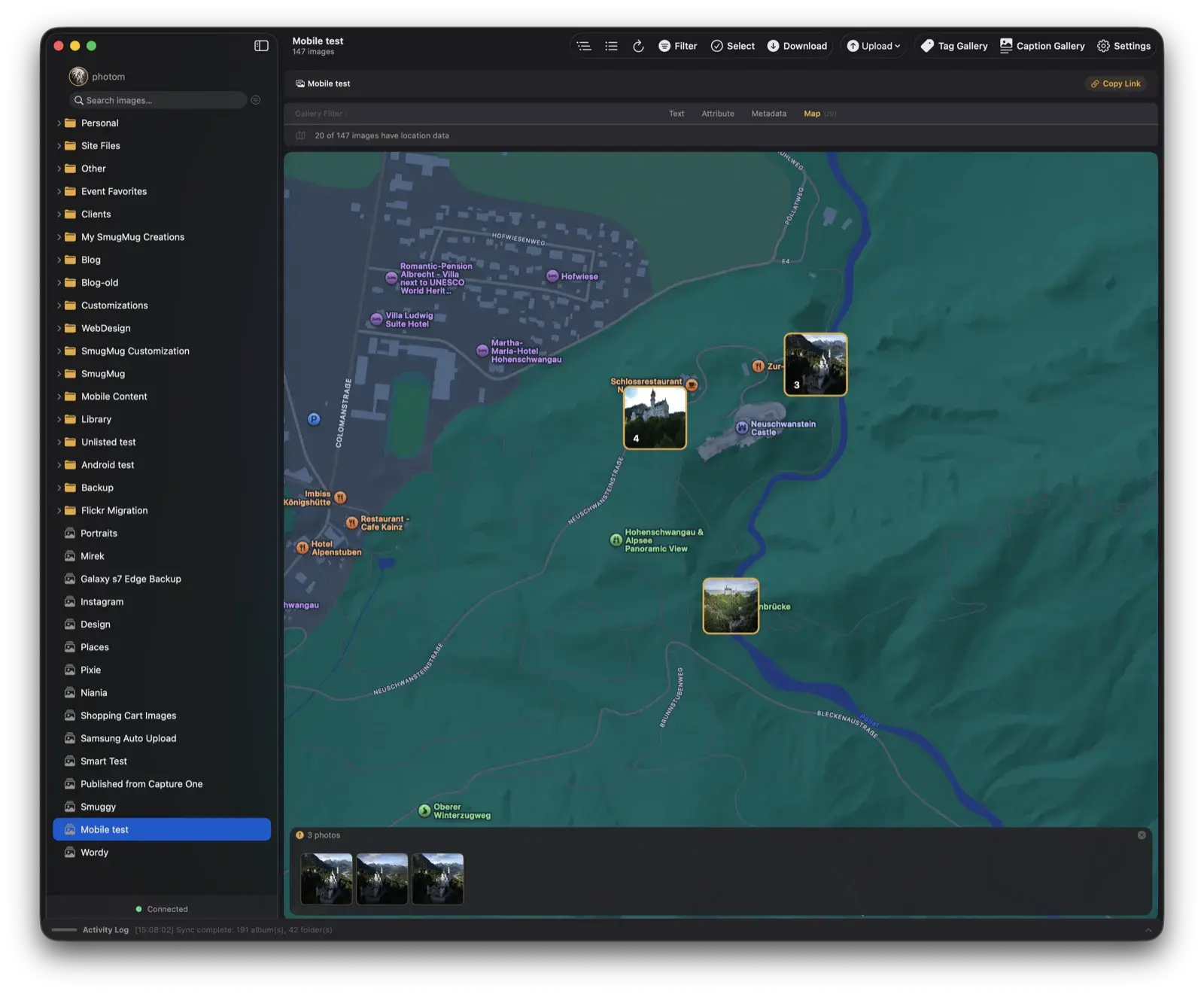
Added
- Advanced Search — a multi-tab search workbench that builds on the basic sidebar search. Filter results by specific fields (Title, Caption, Keywords, Filename), choose match modes (Contains All, Contains, Starts With), and scope your search to a specific folder or gallery instead of your whole account
- Filters — a filter bar with four tabs (Text, Attribute, Metadata, Map) that lets you progressively narrow gallery contents or search results. Filter by file type, orientation, metadata presence, camera model, lens, focal length, ISO, and date taken. Available in both gallery view and Advanced Search. All filters are combinable with live counts and orange dot indicators on active tabs
- Map View — a full interactive map (Apple Maps) that replaces the image grid when you open the Map tab. Every geotagged photo appears as a thumbnail pin at its GPS coordinates. Pins cluster automatically as you zoom out and split apart as you zoom in. Click a pin to open the photo in the lightbox, or click a cluster to zoom into its members. Works in both gallery view and search results, and responds to all active filters
v2.1.2
April 1, 2026Fixed
- Fixed Replace by Filename not replacing — some images were silently skipped during the filename lookup, causing edited files to upload as new copies instead of replacing the existing image
- Fixed an issue where replacements could fail because the wrong image address was sent to SmugMug
v2.1.1
March 31, 2026Added
- Replace by Filename — a new duplicate handling option for uploads. When enabled, uploading a file that shares the same name as an existing image in the gallery will replace it in-place, keeping the same position and URL. Files with identical content are automatically skipped to save bandwidth. The Upload menu now offers three options: Upload All, Skip Duplicates (default), and Replace by Filename
Fixed
- Fixed a crash that could occur when the gallery refreshed while uploads were still processing
v2.1.0
March 11, 2026Added
- Live Sync — your galleries and sidebar now update automatically when changes are made on SmugMug from another device or the web. New uploads, deleted images, and rearranged photos appear within about 30 seconds, with minimal impact on performance
- Bulk Create Folders & Galleries from CSV — build out complex folder and gallery structures in one go. Right-click any folder or use File → Bulk Create from CSV (⌘⇧K) to import a spreadsheet. You can apply album templates, set folder privacy, generate guest upload URLs, and copy or export the results when done. Safe to re-run — existing folders are detected and reused
- Gallery Preset picker — quickly apply an album template to any gallery right from the top of the Gallery Settings panel
Changed
- Thumbnails now load faster and use less memory thanks to a new image loading engine with automatic disk caching
Fixed
- Folder and gallery names containing special characters like "&" no longer fail to create
- Processing thumbnails now refresh properly once SmugMug finishes processing your uploads
- Bulk Create no longer accidentally creates duplicate folders when multiple galleries share the same parent
- Bulk Create now shows clear warnings if applying a template or generating a guest upload URL fails for a gallery, instead of failing silently
- Bulk Create error messages now include the full count of skipped items when a parent folder fails to create
- Bulk Create CSV export now shows an error if the file cannot be saved, instead of failing silently
- Bulk Create result URLs are now clickable — view your new galleries or guest upload links directly from the results table
v2.0.8
March 2, 2026Added
- Folio is officially here! Browse, manage, and back up your entire SmugMug library — natively on your Mac
- Full library browsing with masonry and grid layouts
- AI auto-tagging and auto-captioning powered by Apple Intelligence or Claude Vision
- Upload photos and videos from Finder or Apple Photos
- Migrate your entire Google Photos or Flickr library to SmugMug
- Download albums or back up your full account with smart resume and SHA-256 verification
- Metadata editing, GPS maps, gallery settings, and search across your library
- OAuth tokens stored securely in macOS Keychain — no data passes through third-party servers
- 14-day free trial with full access to every feature